The Monitor Already on Your Desk: Why a Refurbished Mac mini Makes Quiet Sense in 2026
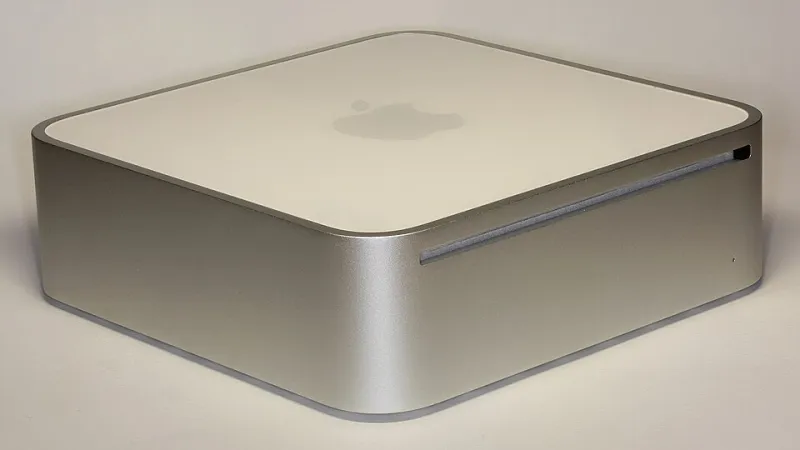
Photo: D-Kuru, CC BY-SA 3.0 at, via Wikimedia Commons
Walk into any Apple conversation in the UK and it goes the same way. MacBook Air this, MacBook Pro that, a brief detour into whether the midnight finish shows fingerprints. The Mac mini barely gets a mention. Which is odd, because for a certain kind of shopper — the one with a half-decent monitor, a keyboard they actually like and a mouse that fits their hand — it is quietly the best value Apple device you can buy second time around.
No screen. No battery. No hinge. Just a small aluminium slab that does the computer part and leaves the rest to kit you already own. If that sounds like a compromise, it is worth looking again.
The desk you have already paid for
Somewhere in your house there is probably a monitor doing very little. A leftover from a home-working phase, a second screen now retired to a cupboard, or the one you bought in 2021 and never quite justified. Add a £40 keyboard, a mouse and a £300 refurbished Mac mini and you have a full desktop setup for less than the price of an entry-level iPad Pro with a keyboard case.
That is the entire pitch, and it holds up surprisingly well. The mini is not a budget machine pretending to be something else. It is the same silicon as the laptops, in a box with more room to breathe.
What £500 actually gets you in 2026
The new M4 Mac mini starts at £599 in the UK, and it is a genuinely excellent thing. But the refurbished market has had five years to fill up with M1 and M2 units, and that is where the interesting numbers sit.
Expect to pay roughly £260–£330 for an M1 mini with 8GB of memory and a 256GB drive from a reputable UK refurb seller, and £380–£470 for an M2 equivalent depending on condition grade and storage. Sixteen-gigabyte models carry a premium of £80–£120 over the 8GB versions, and that premium is usually worth paying. Apple's own certified refurbished store lists minis when stock appears, typically a little under new price with a full one-year warranty — less of a saving, considerably less of a gamble.
A word on the M1 versus M2 question: the M2 is quicker, but not dramatically so for everyday work. If the price gap is £100 or more, the M1 is the smarter buy. If it is £50, take the newer chip and the extra couple of years of software headroom.
Desktops age on a different curve
This is the part people miss. A laptop is a collection of moving parts squeezed into a thin wedge and carried around in a bag. Every hinge cycle, every battery charge, every knock to the lid is wear. A desktop sits still.
A used Mac mini has no battery to swell, no keyboard to go shiny, no trackpad to lose its click, no hinge to loosen. It has a fan, an SSD and a power supply, and the aluminium case does not care whether it has been sitting on a desk for four years. That is why a four-year-old mini often feels fresher than a two-year-old laptop.
It also runs cooler, which matters more than people think. Sustained performance on a mini is closer to its peak than on an Air, and the fan has room to do its job without sounding like a hair dryer.
The memory question is the real decision
Eight gigabytes of unified memory on an M1 or M2 is fine for browsing, documents, streaming, email and light photo editing. It is not fine for thirty browser tabs, Slack, a photo library and a video export running at once. macOS is good at managing memory, but it cannot create it.
This is where the cheapest listing on the page can quietly become the most expensive decision. A 16GB mini at £430 will serve you far longer than an 8GB one at £280. Buy for the workload you will have in three years, not the one you have this afternoon.
What to check before you pay
A used mini is easier to vet than a laptop, because there is less to hide. Still, run through this list.
Activation Lock. Ask the seller to sign out of iCloud and Find My, and confirm the setup screen appears clean. A locked mini is a paperweight.
Serial and coverage. Check the serial number on Apple's coverage page. It tells you the model, the age and whether any AppleCare remains.
Every port. Two Thunderbolt ports, two USB-A, HDMI, Ethernet and a headphone jack on the M1 and M2. Test each one. A dead Thunderbolt port is not a cheap repair.
SSD health. Run smartctl in Terminal, or ask the seller for a screenshot. Look at the percentage used. Anything under ten per cent on a four-year-old machine is normal.
The fan. Put it under load for ten minutes and listen. A rattle or a whine is a warning sign; a gentle whoosh is not.
The power lead. Mac minis use a standard removable cable. Cheap to replace if it goes missing, but worth knowing.
Cosmetics. Light scuffs on the aluminium top are normal and should not put you off. A dented corner or a bent chassis is a different conversation.
Who should walk away
If you need portability, buy a laptop. If you do not own a monitor, the cost of a decent one wipes out most of the saving — though a £150 1080p panel still leaves you ahead of a MacBook Air. If your work involves long video exports, large photo libraries or virtual machines, spend more on memory and storage rather than chasing the lowest price.
And if you want the longest possible macOS runway, be realistic. The M1 mini arrived in late 2020 and the M2 in 2023; both run the current macOS, but the M1 will lose support a year or two earlier. That is a fair trade for the price, as long as you go in knowing it.
The quiet maths
A £300 refurbished mini, a monitor you already own, and a keyboard that cost less than a takeaway for two. That is a complete Apple desktop for under £400, with a processor that still handles most work without complaint, and a resale value that will not collapse overnight.
It is not the exciting purchase. Nobody posts a photo of a Mac mini on Instagram. But second time around, the boring choice is often the one that keeps on paying you back.