Tiny Box, Few Traps: The 2026 Case for a Second-Hand Apple TV 4K
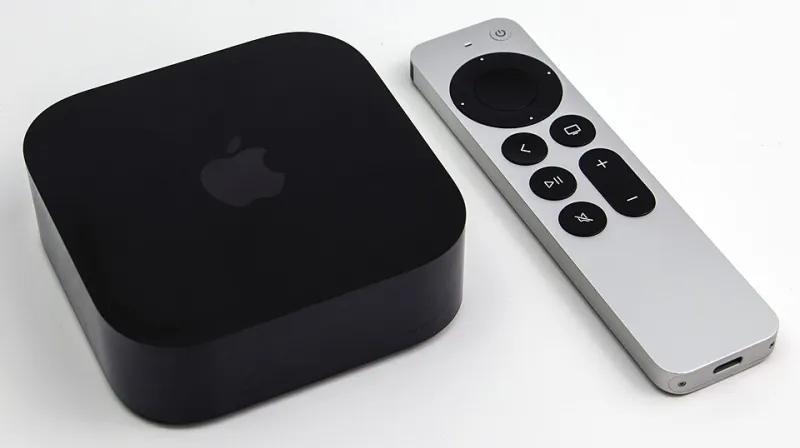
Photo: Dillan Payne, CC BY-SA 4.0, via Wikimedia Commons
Most refurbished Apple purchases ask you to think about battery health, screen condition or whether a previous owner left an iCloud account lurking in the settings. A second-hand Apple TV 4K asks almost none of that. It sits under your telly, draws very little power, has no battery to age, and does one job without much drama. That is exactly why it is one of the smarter refurbished Apple buys in the UK in 2026 — provided you check a few small details that sellers tend to blur.
Why the risk is lower than it looks
A refurbished Apple TV is not a phone with a tired battery or a MacBook with a hinge that has lived a thousand coffee-shop afternoons. The main wear items are the remote, the ports and the storage size. The box itself is a sealed slab with no moving parts. If it powers on, outputs a picture and connects to your Wi-Fi, there is very little left to go wrong.
The software story is also better than many people assume. Apple has kept tvOS running on older Apple TV hardware for years, which means a used unit can still feel current. The catch is that “still supported” is not the same as “will be supported for ages.” Before you pay, check Apple’s current tvOS compatibility list rather than trusting a seller’s phrase like “fully updated.”
The generation map that matters
There are three Apple TV 4K generations worth knowing about. The first arrived in 2017, the second in 2021, and the third in 2022. In late 2026, the second-generation and third-generation 4K models are the safe bets. They are faster, they have the newer Siri Remote design, and they are more likely to keep receiving tvOS updates for a while yet.
The first-generation 4K is the one to treat with caution. It can still be a perfectly good streaming box, and it supports 4K HDR and Dolby Vision, but it is older and closer to the end of its software road. If the price is very low and you only need a secondary telly box, it can make sense. If you are buying the main living-room device and hoping to keep it for five years, spend a little more on a 2021 or 2022 unit.
The older Apple TV HD is best avoided unless it is almost free. It is not a 4K device, and its long-term software future is even less generous.
Check the remote before you fall in love with the price
The Siri Remote is where refurbished Apple TV deals often get fuzzy. The first-generation 4K shipped with the older glass touch remote, which charges by Lightning and lacks the clickpad and dedicated power button of the newer design. The 2021 model brought the aluminium Siri Remote with a clickpad, and the 2022 model moved that remote to USB-C charging.
A missing or wrong remote can wipe out the saving. A replacement Siri Remote is not cheap, and third-party alternatives often lose the touch surface, the IR transmitter or the gyroscope. Ask the seller for a photo of the actual remote, confirm which charging port it has, and check that the buttons are not mushy. If the listing says “remote included” but shows a generic picture, get it in writing.
Ports, Ethernet and the storage question
Apple TV 4K models have varied by storage and networking. Some versions are Wi-Fi only, while others add an Ethernet port. If your broadband router is in another room and your Wi-Fi is patchy, the Ethernet model is worth seeking out. It is also handy if you stream a lot of high-bitrate 4K content and want the most stable connection possible.
Storage is less important than on a phone, because Apple TV apps are small and streaming does the heavy lifting. But a 32GB or 64GB unit can still fill up with games and downloaded content. For most UK households, 64GB is comfortable; 128GB is nice if the price gap is small.
Check the HDMI port for damage and make sure the power lead is the correct UK plug. Apple TV uses a figure-of-eight power cable, so a missing lead is easy to replace, but it is still a small cost to factor in.
HDR and Dolby Atmos: what actually matters in a UK living room
A refurbished Apple TV 4K can output 4K HDR, Dolby Vision and — on newer generations — HDR10+. That sounds impressive, but your TV has to support the same format. A Dolby Vision box and a Dolby Vision telly are a happy pair. A Dolby Vision box and an older HDR10-only set will usually fall back to HDR10, which is fine, but do not pay extra for a feature your screen cannot show.
Dolby Atmos is similar. The Apple TV can pass Atmos audio to a compatible soundbar or AV receiver, but it will not turn a basic TV speaker into a ceiling-mounted cinema. If you have a Atmos soundbar, check that it accepts the format over HDMI. If you do not, treat Atmos as a bonus rather than a reason to buy.
In practice, the UK apps you use matter more than the badge list. BBC iPlayer, ITVX, Channel 4, My5, Netflix, Disney+, Prime Video, Now and Apple TV+ all have a presence on the platform, though app quality and 4K support vary. The Apple TV interface is still one of the cleanest ways to jump between them, and the upscaling on newer models is genuinely useful for older Freeview recordings and 1080p streams.
The savings maths
New Apple TV 4K units have typically sat in the £150 to £190 range in the UK depending on storage and offers. A sensible refurbished second-generation 64GB unit often lands well below that, and a third-generation model can still save you a useful £30 to £60. The saving is real, but it is not enormous.
That changes the calculation. If a seller wants £140 for a used 2021 model with no warranty and a scuffed remote, buy new instead. If you can find a clean 2022 unit with the USB-C remote, Ethernet and a 12-month guarantee for £100 to £120, that is a genuinely good deal. The sweet spot is a late-generation box with the right remote and a returns window.
A short pre-purchase checklist
Ask for the model number, not just “Apple TV 4K.” Confirm which Siri Remote is included and whether it charges by Lightning or USB-C. Check whether the unit has Ethernet. Ask if it has been reset to factory settings and whether it is signed out of the previous owner’s Apple Account. Finally, confirm the returns period and warranty in writing.
Do that, and the Apple TV 4K becomes what it should be: a small, quiet, overachieving box that costs less than new and asks very little of you in return. In the refurbished Apple world, that is a rare and welcome thing.